 Loading... Please wait...

Blog
Recent Posts
Arduino Due Dual CAN Bus Development Platform for Rapid CAN Bus and SAE J1939 Prototyping
Posted by on
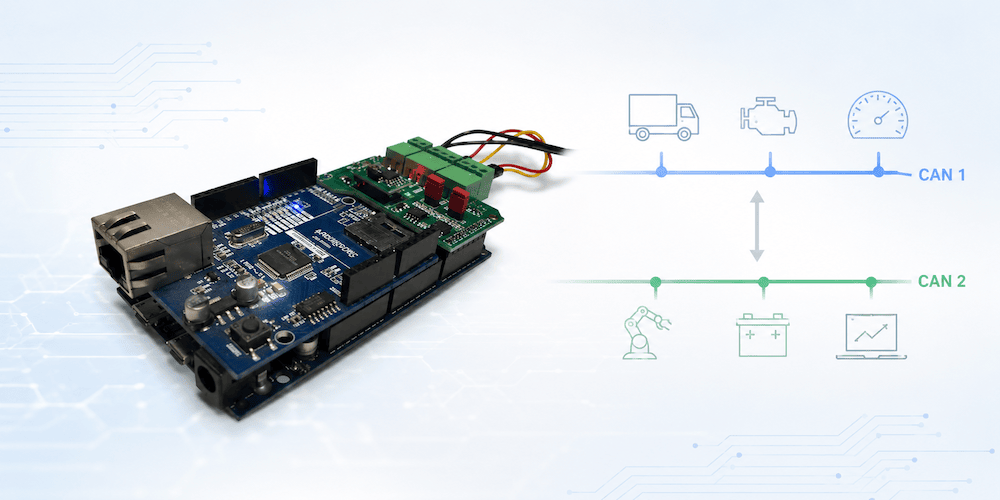 One of the biggest obstacles in CAN bus development is not understanding the CAN protocol itself—it is finding a development platform that lets you move from an idea to a working prototype without spending weeks configuring hardware, writing low-level drivers, or debugging interface electronics.
Whether you are developing an automotive controller, an industrial CAN node, an OBD-II application, or an SAE J1939 ECU, the goal is usually the same: prove the concept quickly and then concentrate on the application itself.
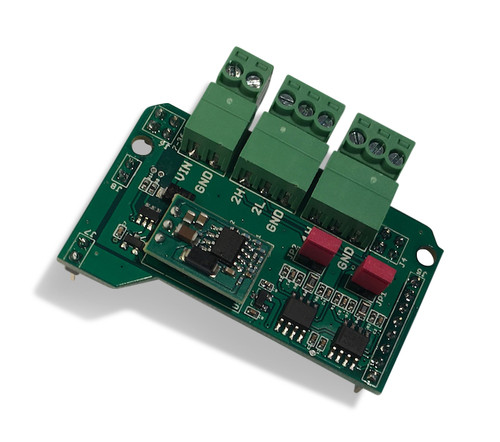 That is precisely where the Dual CAN Bus Interface for Arduino Due with Extended Power Range excels.
Unlike generic CAN modules that require additional hardware, complicated wiring, or external CAN controllers, this interface takes full advantage of the Arduino Due’s two built-in CAN controllers. The board simply adds the required CAN transceivers while providing a clean, professional interface to two independent CAN networks. Combined with the Arduino Due’s 32-bit ARM Cortex-M3 processor running at 84 MHz, the result is a remarkably powerful embedded development platform that remains easy to understand and easy to program.
More Than Hardware—A Complete Development Platform
Many embedded development boards stop at providing the hardware. After that, developers are largely on their own.
The Arduino Due platform supported by Copperhill Technologies takes a different approach.
Over the years, an extensive collection of application examples, software libraries, and complete source code has been developed specifically for CAN bus applications. Instead of beginning with a blank project, engineers can start with working software and adapt it to their own requirements.
This dramatically shortens development time for:
- Rapid prototyping
- Proof-of-concept projects
- Laboratory testing
- Research projects
- Industrial automation
- Automotive development
- Commercial product development
In many cases, developers can have their first CAN messages transmitted within minutes instead of days.
Why the Arduino Due?
Although many newer development boards are available today, the Arduino Due continues to be one of the most practical platforms for Classical CAN development.
It offers:
- Native dual CAN controllers integrated into the processor
- 84 MHz 32-bit ARM Cortex-M3 CPU
- 512 KB Flash memory
- 96 KB SRAM
- Large number of digital and analog I/O
- Mature Arduino software ecosystem
- Excellent debugging support
- Simple USB programming
Unlike SPI-based CAN shields, there is no external CAN controller that consumes processor time or complicates the software architecture. The processor communicates directly through its integrated CAN peripherals, providing a cleaner and more efficient design.
Designed for Real-World Installations
One feature that is often overlooked is the board’s extended power input range of 7 to 36 VDC.
Instead of powering the Arduino through USB or an external regulator during development, the complete system can be powered directly from many industrial and automotive power sources.
This makes it particularly attractive for:
- Heavy-duty vehicles
- Agricultural equipment
- Construction machinery
- Marine electronics
- Industrial control systems
- Mobile laboratory equipment
The board also provides jumper-selectable CAN termination resistors and activity LEDs for both CAN channels, making troubleshooting considerably easier during development.
A Library of Ready-to-Run Applications
Perhaps the greatest advantage of the platform is the large collection of proven software examples that accompany it.
These are not merely “Hello World” demonstrations—they solve real engineering problems.
Dual CAN Port Applications
Learn how to configure and operate both CAN controllers simultaneously. These examples provide an excellent starting point for applications requiring communication with two independent CAN networks.
OBD-II Libraries
Develop diagnostic tools, vehicle monitors, and automotive data acquisition systems using readily available OBD-II interfaces.
ARD1939 SAE J1939 Protocol Stack
For engineers developing heavy-duty vehicle applications, the ARD1939 protocol stack provides a practical implementation of the SAE J1939 protocol.
Rather than studying hundreds of pages of the standard before writing code, developers can work from functioning software examples and build their understanding through practical implementation.
The ARD1939 stack also serves as the foundation for numerous programming examples that demonstrate address claiming, PGN transmission, transport protocol handling, diagnostics, and other essential J1939 functions.
CAN Data Traffic Simulation
No vehicle available?
No problem.
The CAN traffic simulation examples generate realistic CAN traffic, allowing developers to test applications entirely on the workbench before connecting to real hardware.
This capability is invaluable during early software development and automated testing.
CAN Bus Bridge
One of the most popular application examples demonstrates how to connect two independent CAN networks.
Possible uses include:
- Message filtering
- Message translation
- Baud-rate conversion
- Gateway development
- Data logging
- Network isolation
Since the Arduino Due features two native CAN controllers, bridge applications become surprisingly straightforward to implement.
SAE J1939 GPS Application
Another example illustrates how GPS position data can be converted into standard SAE J1939 messages, allowing GPS information to be transmitted directly onto a heavy-duty vehicle network.
This project demonstrates how easily additional sensors and peripherals can be integrated into J1939 systems.
J1939 Baud Rate Converter
Many real-world systems must communicate between 250 kbps and 500 kbps J1939 networks.
Instead of designing such a gateway from scratch, developers can begin with a working reference implementation and customize it to meet their specific requirements.
Build Your Own Application Instead of Reinventing CAN
The greatest value of the platform is not the hardware itself.
It is the fact that developers do not have to begin every project from zero.
Whether your objective is to create a CAN gateway, an ECU prototype, a diagnostic tool, a CAN analyzer, a J1939 controller, or an industrial monitoring device, there is a strong chance that a closely related application example already exists.
That allows you to spend your engineering time developing your product rather than repeatedly solving the same low-level CAN communication problems.
An Ideal Platform for Learning and Professional Development
The Dual CAN Bus Interface for Arduino Due is equally suitable for experienced embedded engineers and developers entering the world of CAN bus networking.
Its straightforward hardware design, mature software ecosystem, and extensive collection of practical examples make it one of the easiest ways to understand CAN bus programming through hands-on experimentation.
Instead of reading endless protocol specifications before writing your first line of code, you can begin with proven software, observe a working system, and then extend it into your own application.
For rapid prototyping, proof-of-concept development, and even commercial embedded products, this combination of hardware, software, and practical examples provides a development environment that remains difficult to match. More information...
Monitoring OBD-II Data Traffic with Raspberry Pi and PiCAN2: A Smart Platform for Vehicle Diagnostics Development
Modern vehicles generate a tremendous amount of diagnostic information through their onboard networks. Whether you're an automotive engineer, software developer, fleet manager, researcher, or simply an enthusiast interested in vehicle data, monitoring OBD-II traffic can provide valuable insights into engine performance, fuel economy, emissions systems, and much more. One of the most practical and cost-effective ways [...]
BLCKTEC 460T OBD2 Scanner Review: A Powerful All-System Diagnostic Tool for Serious DIYers
If you maintain your own vehicle or manage a small repair operation, having a capable diagnostic tool is essential. The BLCKTEC 460T OBD2 Scanner is one of the more advanced consumer-level devices on the market, offering all-system diagnostics, service reset functions, and live-data graphing. Below, we’ll explore what this tool can do, how it performs, [...]
OBD2 Bluetooth Scanner for iPhone, Android, and Windows
The OBDLink MX+ is a unique wireless OBD adapter that transforms any iPhone, iPad, or Android device into a professional-grade diagnostic scan tool, trip computer, and real-time performance monitor capable of accessing manufacturer-specific vehicle data. The newest addition to the OBDLink family is even faster, more reliable, and features richer than its predecessors. It is the only wireless [...]
OBD2 Bluetooth Scanner with App for iOS & Android
The V011 OBD2 Scanner provides a complete diagnostic solution, thoroughly understanding your vehicle's condition. It supports a variety of performance tests, including fast reading of DTCs, access to electronic emission readiness, turning off the CEL or MIL, resetting monitors, reading live data, retrieving the vehicle's VIN, checking battery health, accessing freeze frame data, reviewing sensor data, [...]
Diesel Diagnostic Scan Tool for J1587/J1708, J1939 Trucks
The KZYEE KC601 scanner module is the newest portable heavy-duty vehicle code reader. It can quickly and efficiently read DTCs in the truck's electrical control system, diagnose the fault location, and find the cause of the fault. It is beneficial for all auto repair shops to read and clear fault codes and read live data. The scanner [...]
SAE J1939 and OBD2 Heavy Duty Truck Scanner and Diagnostics
DPF Force Regen & Reset for Cummins Caterpillar Engine -- Reset and clean your DPF professionally, quickly, and efficiently to ensure your engine runs smoothly and meets emissions standards. This all-in-one solution saves you money on maintenance costs. The Inspection Record feature records all DPF inspections to help track and manage maintenance schedules. Full System Diesel [...]
OBD-II and the Hacking of Automotive CAN Bus Networks
Let me clarify: this is not a guide to hacking automotive networks. Instead, I attempt to dismiss some common misconceptions about OBD-II and its supposed ability to control a vehicle (Spoiler alert: It cannot). As someone who has spent considerable time studying and working with CAN Bus technologies, I think it is time to set [...]
Bluetooth OBD2 Scanner and Code Reader for iPhone & Android
EASY-TO-USE OBD2 APP & CAR CODE READER - The FIXD car scanner and OBD app instantly translates 7000+ engine fault codes into plain English on your phone. Wireless Bluetooth connection. Set up in minutes. No car knowledge needed. FIND OUT WHAT’S WRONG WITH YOUR CAR - Even beginners can use the FIXD OBD2 scanner and app [...]
Contactless CAN Bus, SAE J1939, OBD-II, SAE J1708 Reader
CAN (J1939) and J1708 networks transport multiple valuable information for telematics of vehicles and stationary objects, such as engine parameters, ABS, EPS, diagnostic codes (DTC), and much more. Crocodile contactless readers are used in telematics systems to gather data from digital buses without breaking the insulation of wires and electrical contacts and without sending active requests [...]