 Loading... Please wait...

Blog
Recent Posts
Building a Classical CAN to CAN FD Gateway with the ESP32-S3
Posted by on
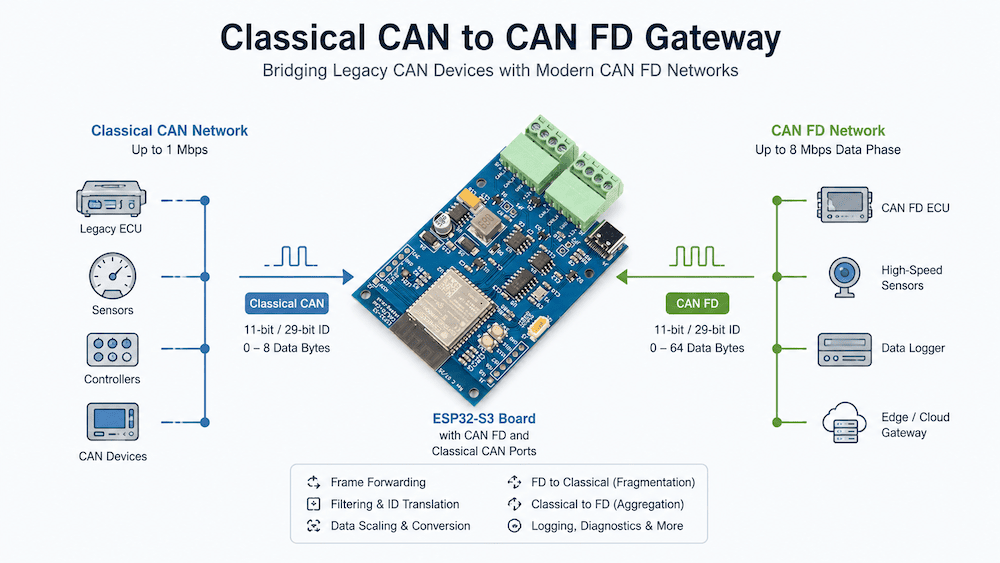 As CAN FD continues to replace Classical CAN in automotive, industrial, agricultural, and heavy equipment applications, many engineers face a familiar dilemma: they have one or more perfectly functional Classical CAN devices that cannot simply be connected to a CAN FD network.
The obvious solution would be to redesign the existing hardware and rewrite the firmware to support CAN FD. In many cases, however, that approach is neither technically nor economically justified.
A protocol gateway provides a much more practical alternative.
Using the ESP32-S3 Board with CAN FD and Classical CAN Ports, developers can build a compact, low-cost gateway that connects legacy Classical CAN equipment to modern CAN FD networks with surprisingly little software effort. The board combines the ESP32-S3's integrated Classical CAN controller with an external MCP2518FD CAN FD controller, giving the microcontroller simultaneous access to two completely independent CAN buses.
Why You Cannot Connect Classical CAN and CAN FD on the Same Bus
One common misconception is that CAN FD is simply a faster version of Classical CAN and that both can coexist on the same physical network.
That is only partially true.
Both protocols use the same arbitration phase, allowing arbitration to occur at the nominal bus speed. However, once a CAN FD frame switches to the higher data rate (Bit Rate Switching - BRS), Classical CAN controllers no longer understand what they are seeing.
A Classical CAN controller interprets the high-speed data phase as a protocol violation and immediately generates error frames. As a result:
-
Classical CAN nodes continuously report errors.
-
CAN FD communication is disrupted.
-
The network becomes unusable.
Therefore, a network containing Classical CAN controllers cannot simply be upgraded by introducing CAN FD traffic. The two technologies must be separated into different physical CAN segments connected through a gateway.
When Does a Gateway Make Sense?
A gateway becomes particularly attractive whenever only a small portion of an existing system requires modernization.
Typical examples include:
-
Adding a new CAN FD sensor to an existing Classical CAN system
-
Connecting legacy ECUs to a modern vehicle backbone
-
Integrating older industrial controllers into new automation systems
-
Agricultural equipment upgrades
-
Marine electronics modernization
-
Laboratory test benches where both technologies must coexist
In many cases, replacing a single legacy ECU would require:
-
New hardware design
-
New firmware development
-
Extensive validation
-
Regulatory re-certification
Developing a gateway often requires only a few hundred lines of software while leaving the existing equipment completely untouched.
Hardware Platform
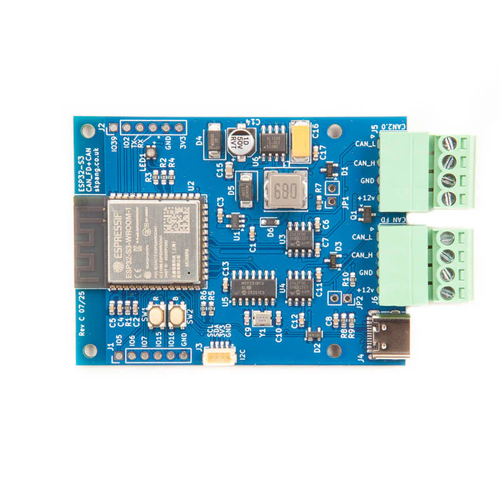 The ESP32-S3 Board with CAN FD and Classical CAN Ports is particularly well suited for this application because it already contains everything needed.
Its dual CAN architecture consists of:
Classical CAN
-
ESP32-S3 integrated TWAI controller
-
Dedicated CAN transceiver
CAN FD
-
Microchip MCP2518FD controller
-
High-speed CAN FD transceiver
-
SPI interface to the ESP32-S3
Additional hardware features include:
-
Dual-core 240 MHz processor
-
8 MB Flash
-
8 MB PSRAM
-
Native USB
-
Wi-Fi
-
Bluetooth LE
-
7–24 V power input
This eliminates the need for external CAN shields or additional processor boards.
The Simplest Gateway
The easiest implementation performs nothing more than frame forwarding.
Whenever a Classical CAN frame is received:
-
Read the CAN identifier.
-
Read the DLC.
-
Copy the data bytes.
-
Transmit the frame on the CAN FD network as a Classical-format CAN frame.
Likewise, incoming Classical-format frames on the CAN FD network are forwarded to the Classical CAN network.
No protocol translation is required.
This solution is often sufficient because CAN FD controllers are fully backward compatible with Classical CAN frames.
The firmware can therefore remain remarkably small.
Message Filtering
Most gateways quickly evolve beyond simple forwarding.
Typical filtering functions include:
-
Forward only selected identifiers
-
Block unwanted traffic
-
Change priorities
-
Separate diagnostic traffic
-
Create virtual subnetworks
Filtering reduces network load and allows the gateway to isolate legacy devices from unnecessary CAN FD traffic.
Identifier Translation
Two independent networks frequently use different identifier assignments.
The gateway can therefore translate:
-
Standard to extended identifiers
-
Extended to standard identifiers
-
One identifier range into another
-
Proprietary identifiers into standardized ones
This enables otherwise incompatible systems to communicate.
Scaling Data
Some systems transmit raw sensor values while newer equipment expects engineering units.
The gateway can therefore perform calculations such as:
-
Temperature conversion
-
Pressure scaling
-
RPM conversion
-
Unit conversion
-
Offset correction
Instead of modifying every ECU, only the gateway firmware requires updating.
Converting CAN FD Frames into Multiple Classical CAN Frames
One of the greatest advantages of CAN FD is its payload size.
Classical CAN:
-
Maximum 8 data bytes
CAN FD:
-
Up to 64 data bytes
When a CAN FD message contains more than eight bytes, the gateway can split the information into several Classical CAN frames.
For example:
64-byte CAN FD payload
↓
Eight Classical CAN messages with 8-byte payloads each
The receiving Classical CAN node simply processes the individual messages according to a predefined protocol.
Depending on the application, the gateway may add:
-
Sequence numbers
-
Packet counters
-
Checksums
-
Start/end markers
-
Timeout monitoring
This approach is particularly useful when transmitting larger datasets such as calibration tables, measurement blocks, configuration parameters, or firmware update packets.
Combining Multiple Classical CAN Frames into One CAN FD Frame
The reverse operation is equally useful.
Suppose eight Classical CAN nodes periodically transmit related sensor values.
Instead of forwarding eight individual messages, the gateway can aggregate them into one CAN FD frame.
Advantages include:
-
Reduced bus utilization
-
Lower protocol overhead
-
Faster transmission
-
Better synchronization of related data
For example:
Eight 8-byte Classical CAN messages
↓
One 64-byte CAN FD frame
This technique is especially attractive when connecting legacy sensors to modern data loggers or cloud gateways.
Data Buffering
Because CAN FD can transmit data considerably faster than Classical CAN, temporary buffering often becomes necessary.
The gateway may need to:
-
Queue incoming Classical CAN messages
-
Assemble complete CAN FD packets
-
Reconstruct fragmented messages
-
Handle burst traffic
-
Prioritize urgent messages
The ESP32-S3's generous RAM resources simplify these tasks.
Timeouts and Error Handling
A robust gateway should never blindly forward data.
Recommended features include:
-
CAN bus error monitoring
-
Bus-off recovery
-
Missing message detection
-
Timeout supervision
-
Duplicate frame detection
-
Queue overflow handling
-
Error statistics
These diagnostics become invaluable during system commissioning.
Additional Intelligent Gateway Functions
Once the gateway exists, additional functionality becomes almost free from a hardware perspective.
Examples include:
-
Message logging to Flash memory
-
USB CAN analyzer
-
Wi-Fi diagnostics interface
-
Bluetooth configuration
-
Remote firmware updates
-
Web-based configuration pages
-
MQTT cloud connectivity
-
OTA firmware updates
-
Data recording for troubleshooting
The gateway effectively becomes a smart communication node rather than merely a protocol converter.
Real-World Applications
A Classical CAN to CAN FD gateway can be used in many environments:
-
Agricultural equipment modernization
-
Heavy-duty vehicle retrofits
-
Industrial automation
-
Marine electronics
-
Robotics
-
Test benches
-
Manufacturing equipment
-
Laboratory instrumentation
-
Prototype development
-
Vehicle diagnostics
In all these cases, the gateway extends the useful life of existing hardware while enabling access to modern CAN FD networks.
Software Complexity Is Lower Than Expected
Many engineers initially assume that developing a Classical CAN to CAN FD gateway requires a major software effort. In reality, the simplest implementation is little more than:
- Receive a frame on one CAN interface
- Copy the CAN identifier
- Copy the DLC
- Copy the payload
- Transmit the frame on the opposite CAN interface
The ESP32-S3 Board with CAN FD and Classical CAN Ports makes the task even easier by including sample source code that already demonstrates simultaneous operation of both the Classical CAN (TWAI) and CAN FD interfaces. This example serves as an excellent starting point for a gateway application, allowing developers to focus on the conversion logic rather than low-level driver implementation. In many cases, the required software consists of only a small amount of application code built on top of the provided example.
From there, additional capabilities can be added incrementally as project requirements evolve:
- Message filtering
- Identifier translation
- Data scaling
- Frame aggregation
- Frame fragmentation
- Diagnostics
- Logging
- Wireless configuration and monitoring
This modular approach allows developers to create a functional gateway with minimal programming effort while retaining the flexibility to expand the software into a sophisticated protocol conversion platform as needed.
Conclusion
Migrating from Classical CAN to CAN FD does not necessarily require replacing every existing controller on the network. In many applications, a dedicated gateway provides a far more practical and economical solution.
By keeping the Classical CAN and CAN FD networks physically separated, the gateway eliminates protocol conflicts while enabling seamless communication between legacy and next-generation devices. Depending on application requirements, it can function as a simple frame forwarder, a sophisticated protocol translator, or an intelligent edge processor that filters, aggregates, fragments, logs, and distributes data across multiple networks.
The ESP32-S3 Board with CAN FD and Classical CAN Ports offers an ideal hardware foundation for such projects. With integrated support for both CAN technologies, abundant processing power, native USB, wireless connectivity, and a flexible software environment, it allows developers to build anything from a straightforward protocol bridge to a feature-rich communication gateway—all without redesigning existing CAN hardware.
 Developing IoT Projects with ESP32: Unlock the full Potential of ESP32 in IoT development to create production-grade smart devices
From smart sensors and edge computing to cloud integration and TinyML, this comprehensive guide walks you through every stage of modern IoT development using the ESP32 and industry-standard tools, frameworks, and technologies.
Key Features
-
Build complete IoT applications from the ground up with ESP32
-
Connect devices securely to the cloud and visualize real-time data
-
Develop practical projects including an audio player, smart home automation, voice-enabled devices, and TinyML applications
Book Description
The ESP32 has become one of the world's most popular microcontrollers for Internet of Things (IoT) applications, combining Wi-Fi, Bluetooth, impressive processing power, and low energy consumption in an affordable platform. Whether you're developing connected sensors, industrial controllers, or smart home devices, this book provides a complete roadmap for creating reliable, production-ready IoT systems.
Beginning with the fundamentals of IoT architecture and real-world design concepts, you'll build an ESP32-based application step by step. Along the way, you'll learn how to interface with sensors, manage peripherals, and integrate powerful libraries such as LittleFS and LVGL. You'll then connect your projects to Wi-Fi networks, implement industry-standard security features, exchange data with cloud platforms, and create professional dashboards using Grafana.
The book also explores emerging edge AI technologies by introducing TinyML on the ESP32-S3. Using the Edge Impulse platform, you'll learn how to develop, deploy, and run machine-learning models directly on embedded hardware, enabling intelligent devices that process data locally without relying on cloud computing.
With numerous hands-on examples and progressively more advanced projects, you'll steadily build practical skills throughout the book. The journey culminates in a complete Smart Home project that brings together embedded hardware, networking, cloud services, security, visualization, and edge AI into one integrated IoT solution.
If you're ready to move beyond simple ESP32 examples and build secure, scalable, and intelligent connected devices, this book will provide the knowledge and practical experience you need. More information...
How to Build a Raspberry Pi CAN-to-Ethernet Gateway
The Controller Area Network (CAN) remains one of the most reliable communication technologies in embedded systems, industrial automation, commercial vehicles, marine electronics, and robotics. At the same time, Ethernet has become the preferred medium for connecting systems over long distances, integrating with cloud services, and providing remote access. Bridging these two worlds is a common requirement [...]
CAN Bus vs. CAN FD: When Is It Worth Upgrading? A Practical Guide for Embedded System Developers
For more than three decades, Classical CAN (Controller Area Network) has been the workhorse of industrial automation, automotive electronics, agricultural machinery, marine systems, and countless embedded applications. It has earned a reputation for exceptional reliability, deterministic communication, and outstanding error detection. Yet the demands placed on embedded networks continue to grow. Today's systems generate far more [...]
Why Embedded Engineers Need Raspberry Pi for CAN Bus Development
The Raspberry Pi has earned its reputation as one of the most versatile embedded computing platforms ever created. Originally introduced as an educational computer, it has evolved into a serious engineering tool used for industrial automation, robotics, automotive development, data acquisition, and IoT applications. For engineers working with CAN Bus and CAN FD networks, adding [...]
Understanding CAN Bus Error Frames: A Practical Guide to Diagnosing CAN Network Problems
When you first connect a new CAN Bus network, everything usually works perfectly—until it doesn't. Your firmware transmits messages, but nothing appears on the network. Your CAN controller reports transmit errors. Suddenly, the node enters Error Passive mode, and eventually Bus Off. Your analyzer may even display Error Frames, but it rarely explains why they occurred. If [...]
ESP32 CAN Bus Projects: Practical Wi-Fi Applications for Embedded Systems
The convergence of wireless networking and CAN Bus technology has fundamentally changed how engineers design embedded systems. For years, CAN Bus networks operated as isolated, wired communication systems found in vehicles, industrial equipment, agricultural machinery, and marine electronics. While they excel at reliable real-time communication, accessing data often required a physical connection through a CAN [...]
Why Professional Engineers Still Use the Arduino IDE in 2026
A recent Facebook comment caught my attention: "Who's using Arduino IDE in 2026?" At first, I dismissed it as another attempt to provoke a reaction. But the more I thought about it, the more I realized that it reflects a common misconception. Many engineers still associate the Arduino IDE exclusively with hobbyists building blinking LEDs and garage [...]
Why Teensy Is One of the Best Microcontrollers for CAN Bus Applications
When engineers begin working with Controller Area Network (CAN) systems, one of the first questions is usually, "Which microcontroller should I use?" The answer depends on the application, but one platform consistently stands out for its combination of performance, flexibility, and ease of development: Teensy. Originally developed by PJRC, the Teensy family has earned an excellent [...]
ESP32 CAN Data Logger over Wi-Fi and Bluetooth: Build a Remote CAN & CAN FD Monitoring System
Industrial machines, commercial vehicles, agricultural equipment, marine electronics, and factory automation systems all generate valuable information over the CAN bus. The challenge is rarely collecting the data—it's accessing that data without being physically connected to the network. Imagine monitoring an engine from your office, recording CAN FD traffic from inside an industrial cabinet without opening the [...]
Building High-Speed Data Loggers with Teensy: From CAN Bus to Connected IoT Systems
Data logging has evolved far beyond simply recording CAN messages to a memory card. Today's engineers expect real-time visualization, multi-channel data acquisition, remote connectivity, cloud integration, and support for modern protocols such as CAN FD—all while maintaining deterministic performance and low latency. If you are designing a professional-grade data logger, the choice of hardware platform can [...]