 Loading... Please wait...

Blog
Recent Posts
Raspberry Pi CAN Bus and LIN Bus Interface: CAN FD Development Made Easy
Posted by on
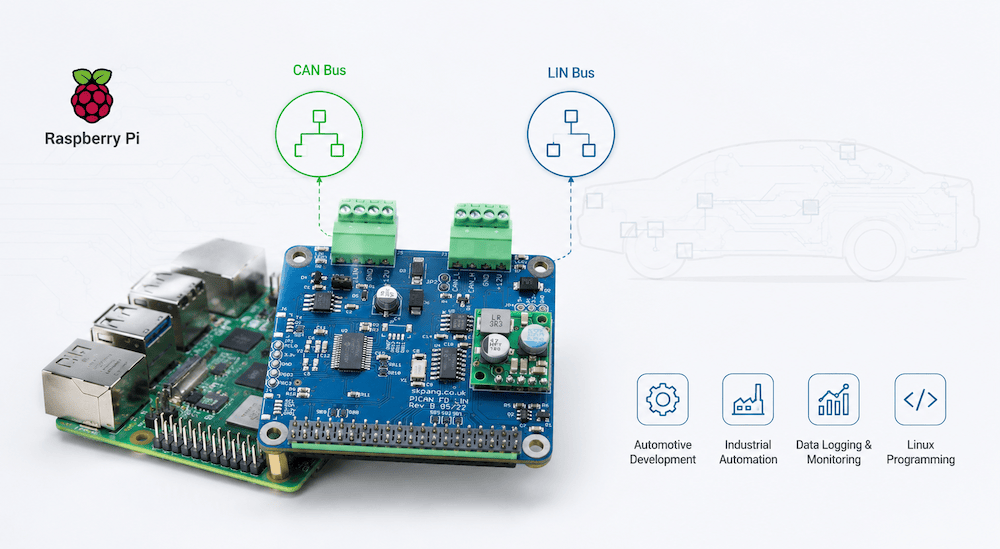 The Raspberry Pi has evolved far beyond its educational roots. With modern multi-core processors, generous memory, Linux support, and an enormous software ecosystem, it has become one of the most capable embedded computing platforms available today.
 When combined with a CAN and LIN interface, the Raspberry Pi transforms into an excellent development platform for automotive, industrial automation, agricultural equipment, robotics, and laboratory test systems.
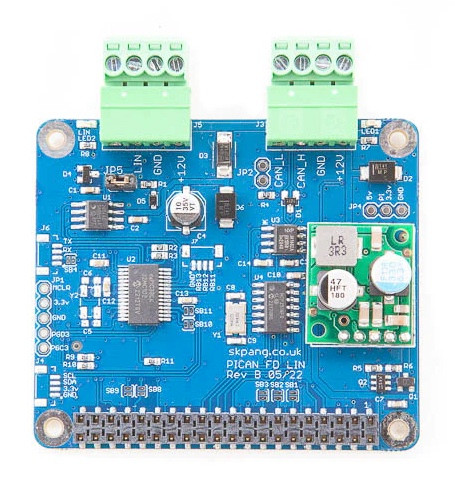
The PiCAN FD with LIN Bus and SMPS for Raspberry Pi provides exactly that capability, allowing developers to communicate with both CAN/CAN FD and LIN networks using a single compact Raspberry Pi HAT.
Why Combine Raspberry Pi with CAN and LIN?
Modern electronic systems rarely rely on a single communication protocol.
CAN Bus serves as the backbone of countless applications, including:
- Automotive ECUs
- Heavy-duty vehicles
- Industrial automation
- Agricultural machinery
- Construction equipment
- Medical equipment
- Robotics
LIN (Local Interconnect Network), on the other hand, is typically used for lower-speed intelligent devices such as:
- Door modules
- Seat controllers
- Climate control systems
- Window motors
- Mirror adjustment
- Lighting modules
- Simple sensor networks
Many automotive products use both networks simultaneously. CAN handles high-speed communication while LIN connects inexpensive local devices.
Having access to both buses from a single Raspberry Pi dramatically simplifies development.
The Raspberry Pi Advantage
Unlike traditional microcontrollers, the Raspberry Pi offers the resources of a complete Linux computer.
Developers gain access to:
- Full Linux operating system
- Python
- C/C++
- Rust
- Go
- Java
- Node.js
- MQTT
- Docker
- SQLite
- PostgreSQL
- Web servers
- Cloud connectivity
- AI and machine learning libraries
Instead of merely transmitting CAN frames, a Raspberry Pi can simultaneously:
- Log gigabytes of network traffic
- Analyze messages in real time
- Serve a web dashboard
- Store data in databases
- Forward information to cloud services
- Generate reports
- Control external equipment
This level of computing power makes the Raspberry Pi attractive for rapid prototyping as well as production applications.
CAN FD and Classical CAN Support
The PiCAN FD board is built around the proven Microchip MCP2518FD CAN controller.
This provides support for:
- Classical CAN (CAN 2.0)
- CAN FD
- Arbitration speeds up to 1 Mbps
- Data rates up to 8 Mbps
Linux recognizes the interface through the standard SocketCAN framework, making it appear as a normal network interface (can0) to user applications. Developers can immediately begin programming in Python or C using familiar SocketCAN libraries and tools.
Integrated LIN Bus Interface
While CAN interfaces for the Raspberry Pi are common, adding LIN capability usually requires additional hardware and software.
The PiCAN FD board integrates both interfaces.
The LIN connection is handled by an onboard dsPIC33 microcontroller, communicating with the Raspberry Pi through a simple UART interface using ASCII commands. Example Python applications are provided, allowing developers to begin experimenting with LIN networks almost immediately.
This architecture keeps LIN communication straightforward while leaving the Raspberry Pi free to concentrate on the application itself.
One Power Supply for Everything
Mobile and industrial applications often operate from vehicle battery voltages.
The integrated 3A switch-mode power supply accepts an input voltage from 7 VDC to 24 VDC, powering both the Raspberry Pi and the interface board from a single supply.
This eliminates additional DC/DC converters and greatly simplifies installation inside vehicles, machines, or industrial cabinets.
Programming Becomes Surprisingly Easy
One of the Raspberry Pi’s greatest strengths is its software ecosystem.
Python developers can rapidly create applications using:
- SocketCAN
- python-can
- tkinter
- Flask
- FastAPI
- NumPy
- Pandas
C and C++ developers can build high-performance applications directly on Linux while taking advantage of existing SocketCAN support.
Because the Raspberry Pi is running Linux, developers also benefit from mature debugging tools, version control, SSH remote access, scripting, and countless open-source libraries.
Instead of reinventing infrastructure, developers can focus on solving application-specific problems.
Typical Applications
The combination of Raspberry Pi, CAN, and LIN opens the door to numerous projects.
Automotive Development
- ECU testing
- LIN device simulation
- CAN gateway development
- Diagnostic tools
- Network monitoring
Industrial Automation
- Machine monitoring
- Gateway between fieldbus systems
- Production data logging
- Remote maintenance
Agricultural Equipment
- ISOBUS development
- Sensor integration
- Vehicle monitoring
- Precision farming applications
Robotics
- Motor controller interfaces
- Distributed sensor networks
- Autonomous vehicle communication
Data Acquisition
- Long-term CAN logging
- LIN event recording
- Predictive maintenance
- Fleet monitoring
Education
Universities and engineering schools can use the Raspberry Pi as a low-cost teaching platform for:
- CAN Bus fundamentals
- CAN FD
- LIN Bus
- Linux programming
- Embedded networking
Students gain hands-on experience with technologies widely used throughout the automotive and industrial sectors.
From Prototype to Finished Product
Many successful embedded products begin life on a Raspberry Pi.
Its powerful processor, mature Linux environment, extensive programming support, and readily available development tools allow engineers to move from concept to working prototype in remarkably little time.
Adding reliable CAN FD and LIN connectivity expands those possibilities even further, making the Raspberry Pi an ideal platform for connected embedded systems.
Whether you’re building an automotive diagnostic tool, an industrial gateway, a laboratory data logger, or a custom control system, combining Raspberry Pi computing power with CAN and LIN networking provides an exceptionally flexible foundation for development.
For engineers looking to bridge Linux computing with real-world vehicle and industrial networks, the PiCAN FD with LIN Bus and SMPS for Raspberry Pi offers a compact, reliable, and developer-friendly solution that is ready to tackle both today’s Classical CAN systems and tomorrow’s CAN FD applications.
 Automotive Ethernet and LIN Bus: A Practical Guide to Vehicle Networking, Communication Protocols, ECU Diagnostics, Cyber Security, and Networking
Have you ever wondered how today’s vehicles exchange massive amounts of data in milliseconds while delivering safer, smarter, and more connected driving experiences? Curious about what makes Automotive Ethernet and LIN Bus such critical technologies in modern vehicles? This book provides a clear, practical introduction to both technologies without burying you in unnecessary jargon. As modern vehicles evolve into sophisticated networks of electronic control units (ECUs), understanding how these systems communicate has become an essential skill for technicians, engineers, students, and automotive enthusiasts alike. Rather than focusing solely on theory, this guide explains the real-world principles behind Automotive Ethernet and LIN Bus, showing how communication protocols, ECUs, diagnostics, cybersecurity, and network reliability come together to support today’s increasingly connected vehicles.
Instead of overwhelming you with complexity, the book builds your knowledge step by step, giving you the confidence to understand vehicle network architectures, ECU communication, message routing, synchronization, and data transmission. You’ll learn how Automotive Ethernet and LIN Bus complement other in-vehicle networks, develop practical diagnostic techniques for identifying communication faults, and gain valuable insight into the cybersecurity challenges facing modern vehicles. Whether you’re an automotive technician looking to sharpen your diagnostic skills, an engineering student building a solid technical foundation, an instructor seeking a practical teaching resource, or simply someone fascinated by automotive technology, this guide delivers knowledge you can immediately apply. As connected vehicles, advanced driver assistance systems, over-the-air software updates, and increasingly sophisticated electronic architectures become the industry standard, the professionals who understand these communication technologies will be best prepared for the future. More information...
CAN Bus Troubleshooting with the PiCAN HATs: Why the Board Is Probably Not the Problem
The PiCAN product line has become the go-to CAN Bus interface solution for Raspberry Pi developers, system integrators, educators, and industrial engineers worldwide. From entry-level CAN Bus connectivity to advanced dual-channel CAN, CAN FD, GPS/GNSS integration, RS232, RS485, and real-time industrial networking, PiCAN boards combine robust hardware design with seamless Raspberry Pi integration. Whether you [...]
Testing NMEA 0183 For The PICAN-M - NMEA 0183 & NMEA 2000 HAT For Raspberry Pi
PICAN-M - NMEA 0183 & NMEA 2000 HAT For Raspberry Pi Our PICAN-M (M = Marine) is a Raspberry Pi HAT with NMEA 0183 and NMEA 2000 connection. The NMEA 0183 (RS422) port is accessible via a 5-way screw terminal. The NMEA 2000 port is accessible via a Micro-C connector. The board comes with a 3A SMPS [...]