 Loading... Please wait...

Blog
Recent Posts
Build a Professional SAE J1939 Test Bench for Under $200
Posted by on
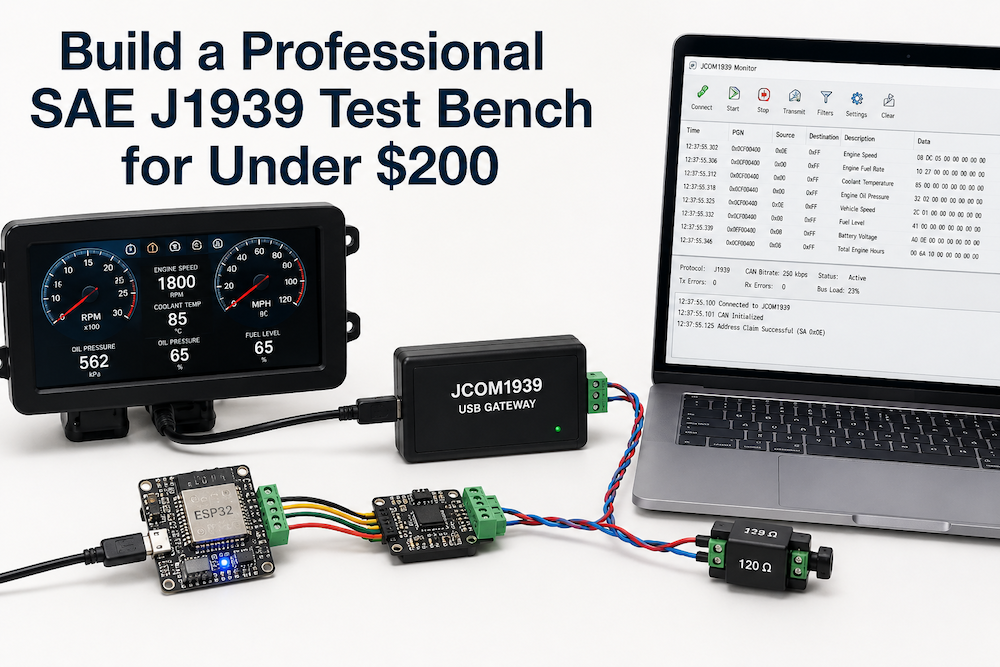 Imagine you're developing—or simply testing—a J1939 device. Perhaps it's a dashboard, a CAN gateway, a telematics unit, a data logger, a display, or a diagnostic application. You don't have access to a truck, and even if you did, you probably wouldn't want to leave the engine running all day just to verify that your software correctly interprets engine speed, coolant temperature, or vehicle speed.
This is where many engineers begin looking for professional J1939 simulation equipment.
Companies such as Vector, Intrepid Control Systems, and ETAS offer exceptional development platforms capable of simulating complete vehicle networks. They are indispensable for OEMs and Tier-1 suppliers developing production vehicles.
However, many engineers simply need a reliable J1939 test bench that can generate realistic traffic, simulate an ECU, and communicate with custom software. For those applications, there is often a far more practical and economical solution.
Professional Development Platforms Have Their Place
There is no question that platforms such as Vector CANoe, Intrepid Vehicle Spy, or ETAS INCA are the right choice for many engineering organizations.
If you are developing production ECUs for a major vehicle manufacturer, validating complete vehicle networks, performing Hardware-in-the-Loop (HIL) testing, or integrating dozens of ECUs into a complete vehicle architecture, these platforms provide capabilities that justify their cost.
That is exactly what they were designed to do.
However, many engineers work on projects that are considerably smaller.
The Reality for Most Engineers
Many developers simply need to:
-
Test a single ECU
-
Simulate engine data
-
Verify a dashboard
-
Generate J1939 traffic
-
Develop embedded firmware
-
Validate proprietary PGNs
-
Demonstrate a prototype
-
Troubleshoot communication problems
-
Build educational or laboratory projects
None of these tasks necessarily requires an enterprise-level development platform.
In fact, using such a platform for many everyday development tasks can be comparable to using a commercial flight simulator to learn how to drive a car.
A Practical Alternative
The JCOM1939 development tools were designed with a different philosophy.
Instead of providing every imaginable feature, it focuses on the functionality that embedded developers actually need.
Combined with an ESP32, Arduino, or Teensy microcontroller, it becomes possible to build surprisingly capable J1939 simulation and diagnostic systems at a fraction of the cost of traditional automotive development platforms.
Typical projects include:
-
J1939 Engine ECU simulation
-
Dashboard testing
-
Instrument cluster development
-
Gateway development
-
CAN Bus monitoring
-
Data logging
-
Proprietary PGN development
-
Software debugging
-
Laboratory demonstrations
For many projects, this is entirely sufficient.
Build Your Own J1939 Engine ECU
One of the most common misconceptions is that ECU simulation requires expensive hardware.
It doesn't.
Using the open-source ARD1939 protocol stack together with an ESP32, Arduino, or Teensy, you can create a fully programmable J1939 ECU that transmits virtually any standard or proprietary PGN your application requires.
Need to simulate:
-
Engine Speed
-
Coolant Temperature
-
Oil Pressure
-
Fuel Level
-
Vehicle Speed
-
Engine Hours
-
Proprietary parameters
Simply modify the application software.
Unlike fixed-function simulators, every aspect of the ECU can be customized because you control the source code.
Complete PC Integration
On the PC side, the JCOM1939 USB Gateways provide communication through a documented serial protocol.
Your own Windows or Linux applications can:
-
Receive CAN traffic
-
Transmit messages
-
Filter PGNs
-
Monitor Address Claim
-
Read CAN error counters
-
Control message transmission
-
Automate testing
No proprietary SDK is required.
If your programming language supports serial communication, it can communicate with the gateway.
JCOM1939 Monitor Software
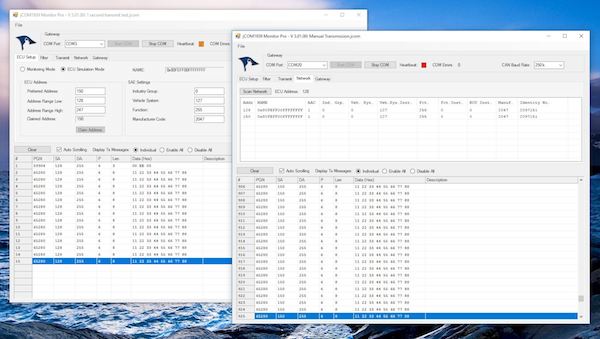
While many engineers eventually choose to develop their own diagnostic or test software, that is not a requirement. The JCOM1939 Monitor Software, included free-of-charge with the JCOM1939 USB Gateway, provides a comprehensive Windows-based environment for monitoring, transmitting, receiving, and simulating SAE J1939 traffic right out of the box. It supports CAN initialization, J1939 Address Claim, PGN filtering, periodic message transmission, Silent Mode operation, protocol status monitoring, and CAN error monitoring, making it an ideal tool for validating ECUs, dashboards, gateways, displays, and other J1939-compatible devices.
Perhaps more importantly, the JCOM1939 Monitor Software demonstrates the capabilities of the gateway itself. Every function performed by the software uses the same documented serial communication protocol that is available to application developers. There are no proprietary interfaces or hidden commands reserved for the monitor application. As your testing requirements grow, you can continue using the same hardware while developing custom Windows, Linux, or cross-platform software that communicates directly with the gateway through its documented programming interface.
Learn While You Build
Perhaps the greatest advantage of this approach is educational.
Instead of treating J1939 as a black box, you develop an understanding of how the protocol actually works.
You learn:
-
Address Claim
-
Transport Protocol
-
PGNs
-
SPNs
-
CAN message timing
-
Error handling
-
ECU behavior
The same hardware used for learning can later become part of your development environment.
The Right Tool for the Right Job
This article is not intended to suggest that professional development platforms are unnecessary.
Quite the opposite.
Companies such as Vector, Intrepid Control Systems, and ETAS have earned their reputations by providing industry-leading solutions for demanding automotive development programs.
But not every engineering task requires that level of investment.
If your objective is to develop embedded software, simulate a J1939 ECU, build custom diagnostic tools, prototype new ideas, or simply understand how SAE J1939 works, a practical development platform costing well under $200 may accomplish everything you need.
The best development tool is not always the most expensive one.
It is the one that fits your project.
 SAE J1939 Starter Kit And Network Simulator
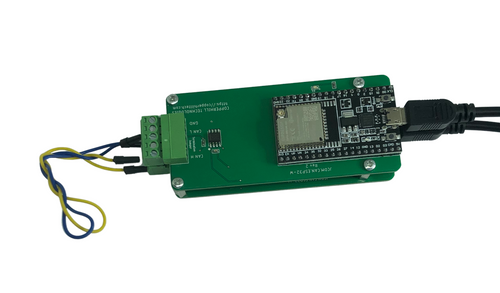
The SAE J1939 Starter Kit and Network Simulator is a complete bench-top development and testing platform for engineers who need to monitor, analyze, record, and simulate SAE J1939 communication without connecting to a diesel engine or other vehicle. The kit includes two J1939-USB interface boards that create a fully functional J1939 network, allowing users to transmit and receive PGNs, experiment with address claiming, transport protocol messaging, diagnostic communication, and network management in a controlled environment. Whether you are learning the protocol or developing a commercial application, the starter kit eliminates the need for expensive vehicle access while providing a realistic J1939 test network.
Designed for both beginners and experienced developers, the kit integrates seamlessly with the Windows-based JCOM1939 Monitor software for real-time network monitoring, ECU simulation, message recording, and traffic analysis. Its documented USB communication protocol and available source code make it easy to interface with custom software running on Windows, Linux, Raspberry Pi, Arduino, ESP32, Teensy, or other embedded platforms. From evaluating new concepts to developing production-ready J1939 applications, the starter kit provides a powerful, affordable, and flexible environment for accelerating development while avoiding the cost and complexity of traditional automotive test equipment. More information...
Mastering SAE J1939: Real-Time Simulation & Monitoring Made Easy
The SAE J1939 ECU Simulator Board by Copperhill Technologies is a high-performance, low-latency vehicle network adapter designed for SAE J1939 applications. It allows any host device with a USB COM port to monitor SAE J1939 data traffic and communicate with the SAE J1939 vehicle network. The board supports the full SAE J1939 protocol, including J1939/81 [...]
Comprehensive Guide to the JCOM1939 Monitor: SAE J1939 Data Analysis, Simulation, and Hardware Integration
The JCOM1939 Monitor Software is a comprehensive Windows application developed by Copperhill Technologies, designed to monitor, record, analyze, and simulate SAE J1939 data traffic. It serves as an essential tool for professionals and enthusiasts working with Controller Area Network (CAN) protocols, particularly in heavy-duty vehicle networks. Key Features: ECU Simulation Setup: Users can configure Electronic Control Units [...]
jBoard-X2 - Hardware Installation For SAE J1939 Data Monitor, Analyzer, ECU Simulator
This post describes the installation and connection of the Copperhill SAE J1939 Data Monitor, Analyzer, ECU Simulator With jBoard-X2. This is the perfect tool to monitor, analyze, and simulate SAE J1939 data traffic. The system combines our industrial-strength jBoard-X2 that functions as an SAE J1939 to USB gateway. A comprehensive and easy-to-use, easy-to-understand Windows software displays not only [...]