 Loading... Please wait...

Blog
Recent Posts
Turning a Raspberry Pi into a Professional CAN Data Logger
Posted by on
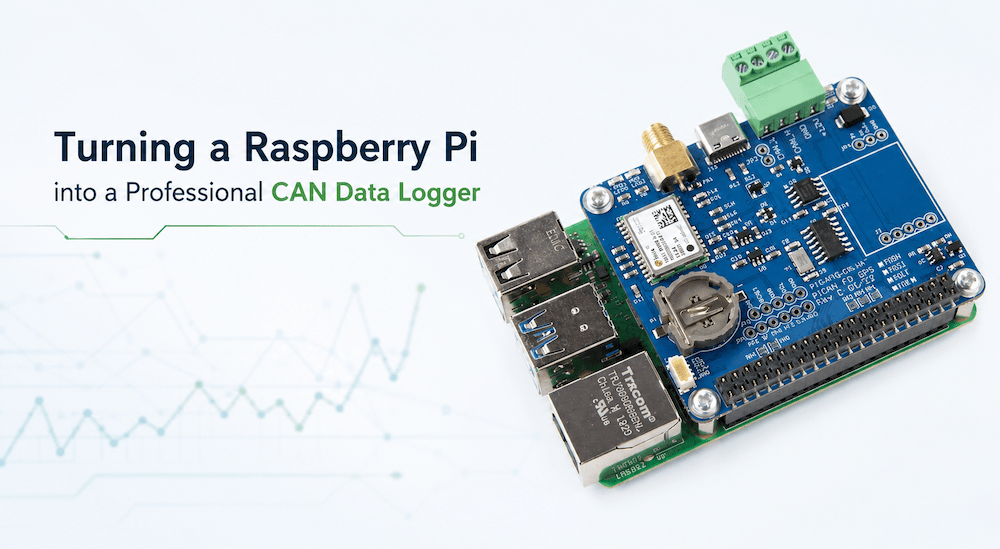 One of the greatest advantages of the Raspberry Pi is its ability to transform from a low-cost single-board computer into a surprisingly capable engineering platform. Add a CAN Bus interface, and it becomes much more than a hobbyist computer—it becomes a powerful tool for data acquisition, diagnostics, and embedded systems development.
Whether you're troubleshooting a machine in the field, validating an embedded controller, or collecting long-term operating data, a Raspberry Pi equipped with a PiCAN HAT provides a compact, reliable, and highly flexible CAN data logger. Thanks to Linux and SocketCAN support, developers can leverage a mature software ecosystem while benefiting from hardware specifically designed for professional CAN applications.
The Copperhill PiCAN Series: Professional CAN Connectivity for Raspberry Pi
The Copperhill PiCAN Series transforms the Raspberry Pi into a powerful platform for CAN Bus development, testing, data logging, and industrial communication. Designed for engineers, system integrators, and embedded developers, the PiCAN family supports a wide range of applications, from automotive and heavy-duty vehicles to industrial automation, robotics, and marine electronics. Whether your project requires Classical CAN, CAN FD, GPS integration, Ethernet connectivity, or combinations of these technologies, there is a PiCAN solution engineered to meet your requirements.
More than just interface boards, PiCAN products provide a reliable foundation for professional embedded networking projects. With seamless SocketCAN support under Linux, developers can immediately take advantage of a mature software ecosystem while focusing on their applications instead of hardware integration. From rapid prototyping to field data acquisition and production-ready edge computing solutions, the Copperhill PiCAN Series offers the flexibility, performance, and expandability needed to accelerate development and bring innovative CAN-based systems to market faster.
Why Log CAN Data?
Logging CAN traffic is often the first step toward solving difficult engineering problems. Instead of trying to reproduce an intermittent fault while watching live messages scroll across a screen, a data logger records everything for later analysis.
Typical applications include:
-
Vehicle and industrial equipment diagnostics
-
Validation of embedded control software
-
Long-term performance monitoring
-
Capturing intermittent communication failures
-
Reverse engineering proprietary CAN networks
-
Recording field data for later analysis
-
Performance and reliability testing
A Raspberry Pi can easily operate unattended for hours, days, or even weeks while storing CAN messages on removable media or network storage.
More Than Just a CAN Interface
The PiCAN family is much more than a single CAN Bus board. Depending on the application, you can choose from a wide range of hardware configurations designed for different development requirements.
Available options include:
-
Classical CAN (CAN 2.0A/B)
-
CAN FD for higher bandwidth applications
-
Single- or dual-channel interfaces
-
Galvanically isolated versions
-
Real-Time Clock (RTC)
-
Integrated GPS/GNSS receivers for location-aware logging
-
Ethernet variants, including Single Pair Ethernet (10BASE-T1S and 10BASE-T1L)
-
Additional interfaces such as LIN on selected models
This flexibility allows developers to select exactly the hardware required without redesigning their software environment.
GPS Adds Valuable Context
CAN messages alone tell you what happened.
Adding GPS data tells you where it happened.
For fleet testing, autonomous vehicles, agricultural equipment, off-highway machinery, marine applications, and many industrial systems, combining CAN traffic with accurate position information provides a much clearer picture of system behavior.
Imagine being able to correlate:
-
Engine load versus vehicle location
-
Hydraulic pressure versus terrain
-
Battery performance versus route
-
Communication errors versus geographic position
Instead of reviewing isolated CAN frames, engineers gain a complete operational timeline.
Ethernet Opens New Possibilities
Some PiCAN boards extend beyond traditional CAN interfaces by incorporating Ethernet technologies.
This makes it possible to develop distributed systems where CAN data is collected locally while simultaneously being forwarded to remote computers, cloud services, or supervisory control systems.
Typical applications include:
-
Remote diagnostics
-
Edge computing
-
Industrial gateways
-
Fleet monitoring
-
Distributed test systems
Rather than simply storing data on the Raspberry Pi, logged information can become immediately available throughout the network.
Classical CAN or CAN FD?
Many existing systems continue to rely on Classical CAN, while newer designs increasingly adopt CAN FD to support larger payloads and higher data throughput.
Fortunately, the PiCAN family supports both technologies. Engineers can select a board optimized for traditional CAN networks or one that supports CAN FD while remaining compatible with existing Classical CAN installations.
This makes the Raspberry Pi equally suitable for maintaining legacy systems and developing next-generation embedded products.
Software That Works Like Linux Networking
One of the major strengths of the Raspberry Pi platform is its integration with SocketCAN.
Instead of proprietary drivers or custom APIs, CAN interfaces appear as standard Linux network devices. Developers can immediately take advantage of well-established Linux tools, scripting languages, and software libraries for logging, filtering, transmitting, and analyzing CAN traffic.
The result is a development environment that is both familiar and highly portable.
A Valuable Development Tool
A Raspberry Pi equipped with the appropriate PiCAN HAT can replace far more expensive dedicated logging equipment in many development environments.
Its compact size, low power consumption, Linux operating system, and extensive hardware options make it suitable for automotive, industrial automation, robotics, marine electronics, agricultural equipment, and research projects alike.
Perhaps most importantly, it grows with your project. A simple CAN logger today can evolve into a gateway, diagnostic tool, telemetry unit, or embedded controller tomorrow—all while using the same Raspberry Pi platform and the same PiCAN hardware family.
This topic is an excellent fit for Copperhill because it educates engineers first and naturally demonstrates why the PiCAN product family exists, without turning the article into a product catalog. I would continue this series with similarly problem-oriented posts rather than individual product descriptions.
Raspberry Pi CAN FD and 10BASE-T1L: Building Industrial IoT and Embedded Networking Solutions
The Raspberry Pi has become one of the world’s most popular embedded computing platforms. It is inexpensive, powerful, runs a full Linux operating system, and supports countless programming languages and development tools. Yet many engineers quickly discover a limitation when they move from software development into real-world industrial applications. The Raspberry Pi provides Ethernet, USB, Wi-Fi, Bluetooth, [...]
Raspberry Pi CAN Bus and LIN Bus Interface: CAN FD Development Made Easy
The Raspberry Pi has evolved far beyond its educational roots. With modern multi-core processors, generous memory, Linux support, and an enormous software ecosystem, it has become one of the most capable embedded computing platforms available today. When combined with a CAN and LIN interface, the Raspberry Pi transforms into an excellent development platform for automotive, industrial [...]
CAN Bus Troubleshooting with the PiCAN HATs: Why the Board Is Probably Not the Problem
The PiCAN product line has become the go-to CAN Bus interface solution for Raspberry Pi developers, system integrators, educators, and industrial engineers worldwide. From entry-level CAN Bus connectivity to advanced dual-channel CAN, CAN FD, GPS/GNSS integration, RS232, RS485, and real-time industrial networking, PiCAN boards combine robust hardware design with seamless Raspberry Pi integration. Whether you [...]
IoT Meets CAN: Building Cloud-Connected Fleet Monitoring with Raspberry Pi + PiCAN3
The Internet of Things (IoT) is reshaping how vehicles and industrial equipment are monitored and maintained. At the heart of this transformation lies the ability to connect embedded systems—such as those using the CAN Bus protocol—to the cloud. By linking CAN data to online dashboards and analytics tools, fleet operators gain real-time insights into vehicle [...]
Beginner’s Guide to Using SocketCAN with Raspberry Pi and PICAN Board
This guide will walk you through the basics of using SocketCAN on a Raspberry Pi with a PICAN CAN Bus HAT. We will cover what SocketCAN is and how it works, then explain how to set up the hardware (attaching the PICAN board and wiring the CAN bus). Next, we’ll detail the software configuration on [...]
CAN Bus Development for Embedded Systems: With and Without an Operating System
The Controller Area Network (CAN) Bus has become an essential communication protocol in automotive, industrial, marine, and robotics applications due to its robustness, efficiency, and real-time capabilities. When it comes to embedded systems, developers have multiple hardware and software platforms to choose from—some with full operating systems (OS), others running bare-metal (without OS). At Copperhill Technologies, [...]
CAN Bus Applications in Automotive, Marine, Robotics, and Industrial Systems Using the PiCAN Series of HATs for Raspberry Pi
The Controller Area Network (CAN Bus) is a resilient, lightweight, and highly efficient communication protocol originally developed by Bosch in the 1980s for automotive systems. Today, CAN Bus has evolved far beyond its automotive roots, extending into marine electronics, robotics, industrial automation, and more. One of the most accessible and flexible ways to prototype or [...]
Exploring the PiCAN Series and SocketCAN: A Powerful Duo for Raspberry Pi CAN Bus Applications
The PiCAN series from Copperhill Technologies brings robust CAN Bus capabilities to Raspberry Pi systems, providing essential tools for automotive, industrial, and robotics projects. These boards are compact, powerful, and compatible with SocketCAN, the standard CAN interface for Linux systems. Whether you’re developing diagnostic tools, data loggers, or real-time communication systems, PiCAN HATs offer a [...]
Exploring the PiCAN2: CAN Bus HAT for Raspberry Pi
The PiCAN2 HAT by Copperhill Technologies is a robust and feature-rich CAN Bus interface board designed for seamless integration with the Raspberry Pi. It opens up exciting opportunities for CAN Bus development in automotive, industrial, and embedded applications. Developed by SK Pang Electronics and distributed by various vendors, the PiCAN2 is popular among professionals and [...]