 Loading... Please wait...

Blog
Recent Posts
Build a CAN Data Logger with Raspberry Pi and the PiCAN3 CAN Bus Interface
Posted by on
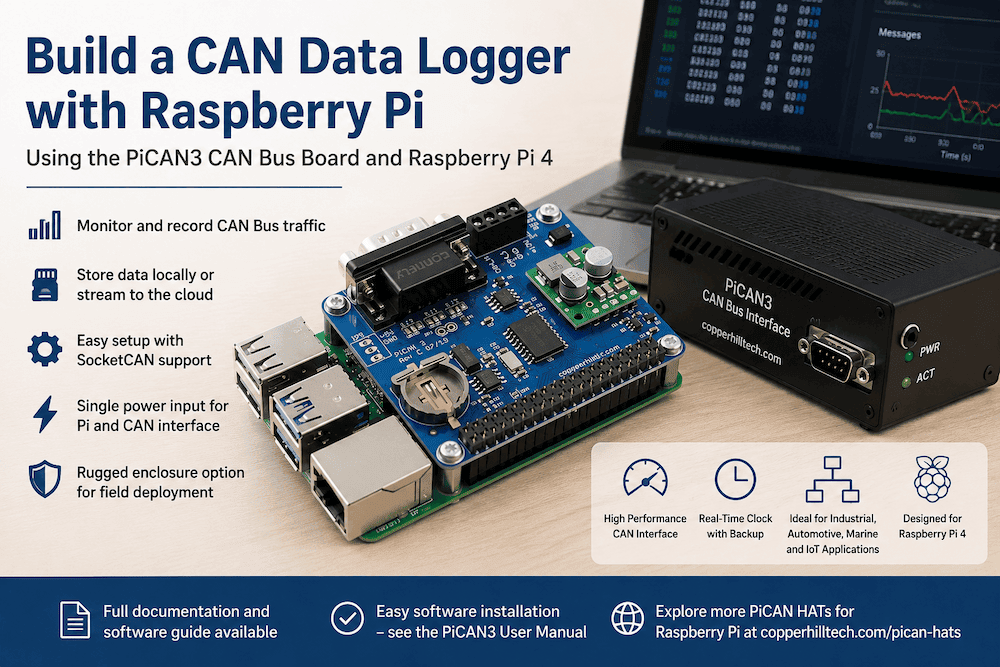 The Raspberry Pi has become one of the most popular platforms for embedded development, industrial automation, vehicle diagnostics, and data acquisition. Combine it with a CAN Bus interface, and you have a powerful yet affordable platform capable of monitoring and recording data from virtually any CAN-based system.
Whether you are working with industrial equipment, agricultural machinery, marine electronics, electric vehicles, or custom automation systems, a Raspberry Pi-based CAN data logger can provide valuable insights into network activity and system performance.
The good news is that building such a system is far easier than many developers expect.
Why Use Raspberry Pi for CAN Data Logging?
A CAN data logger needs three essential components:
- A computer to process and store the data
- A CAN interface to communicate with the network
- Software to capture and manage the incoming messages
The Raspberry Pi 4 provides an excellent foundation for this task. It offers:
- Quad-core processing power
- Gigabit Ethernet
- Built-in Wi-Fi and Bluetooth
- USB ports for additional peripherals
- Large storage options through microSD cards or USB drives
- Low power consumption
When paired with the PiCAN3 CAN Bus Board, the Raspberry Pi becomes a professional-grade CAN data acquisition platform suitable for both laboratory and field applications.
 The PiCAN3 CAN Bus Board
The PiCAN3 is specifically designed for the Raspberry Pi 4 and provides all hardware required to connect the system to a CAN network. The board includes:
- MCP2515 CAN controller
- MCP2562 CAN transceiver
- DB9 CAN connector
- Screw-terminal CAN connection
- Real-time clock with battery backup
- Integrated 3A switch-mode power supply
- Full SocketCAN support under Linux
One of the most useful features is the onboard power supply, which accepts input voltages from 6 to 20 VDC and powers both the PiCAN3 and the Raspberry Pi from a single source. This makes the system particularly attractive for vehicle and industrial installations.
Choosing the Right Raspberry Pi
While newer Raspberry Pi models continue to increase in processing power, the Raspberry Pi 4 remains the preferred choice for the PiCAN3.
The reason is simple: The PiCAN3's integrated 3A power supply was designed specifically to support the Raspberry Pi 4. The Raspberry Pi 5 can draw substantially higher current, particularly when operating under heavy CPU loads or when powering external peripherals. For that reason, we recommend using the PiCAN3 with the Raspberry Pi 4 for reliable operation.
For most CAN data logging applications, the processing capabilities of the Raspberry Pi 4 are more than sufficient.
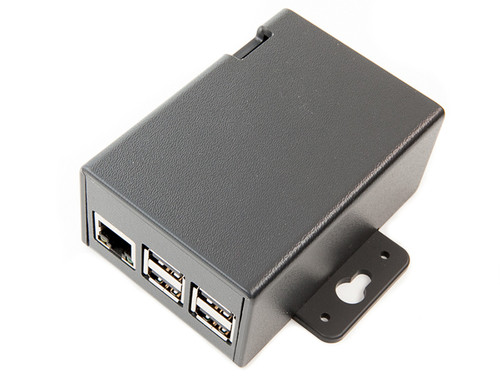 Adding a Rugged Enclosure
Many data logging projects eventually leave the development bench and move into vehicles, industrial cabinets, or field environments.
To simplify deployment, a dedicated enclosure is available for the Raspberry Pi 4 and PiCAN3 combination. The enclosure provides:
- Mechanical protection
- Clean cable routing
- Professional appearance
- Easy mounting
- Protection against accidental contact with electronics
The result is a compact and robust CAN data logging platform that is suitable for both development and long-term deployment.
Software Installation Made Easy
One of the major advantages of the Raspberry Pi ecosystem is the maturity of its software environment.
The PiCAN3 supports Linux SocketCAN, the standard CAN networking framework used by Linux systems. SocketCAN allows applications written in C, C++, Python, Node.js, and many other programming languages to access CAN messages through a consistent interface.
Installation is straightforward and requires only a few configuration steps.
Rather than duplicating the setup procedure here, we recommend following the official PiCAN3 User Manual, which provides detailed instructions for:
- Hardware installation
- Raspberry Pi configuration
- Driver setup
- CAN interface activation
- Bit-rate configuration
- Diagnostic testing
Most users can have the system communicating on a CAN network within minutes.
Creating the Data Logger
Once the CAN interface is operational, the Raspberry Pi can begin capturing CAN traffic immediately.
Popular approaches include:
- Logging raw CAN frames to files
- Storing data in SQLite databases
- Saving information to CSV files
- Streaming data to cloud applications
- Publishing messages through MQTT
- Building custom dashboards
Python is particularly popular for CAN data logging because of the availability of excellent CAN and data-processing libraries.
Applications
A Raspberry Pi 4 and PiCAN3 combination can be used for numerous applications:
- Vehicle diagnostics
- Fleet monitoring
- Industrial machine monitoring
- Agricultural equipment testing
- Electric vehicle development
- Marine electronics monitoring
- CAN network troubleshooting
- Predictive maintenance systems
The flexibility of the platform allows it to grow from a simple CAN monitor into a sophisticated data acquisition system.
Conclusion
Building a CAN data logger no longer requires expensive proprietary hardware or specialized development tools. A Raspberry Pi 4 combined with the PiCAN3 CAN Bus Board provides a reliable, affordable, and highly flexible platform for monitoring and recording CAN network traffic.
With support for Linux SocketCAN, a robust onboard power supply, integrated real-time clock, and an optional metal enclosure, the PiCAN3 transforms the Raspberry Pi into a professional CAN data logging system suitable for both development and deployment.
If your project requires collecting, analyzing, or storing CAN Bus data, the Raspberry Pi 4 and PiCAN3 combination offers one of the most practical solutions available today.
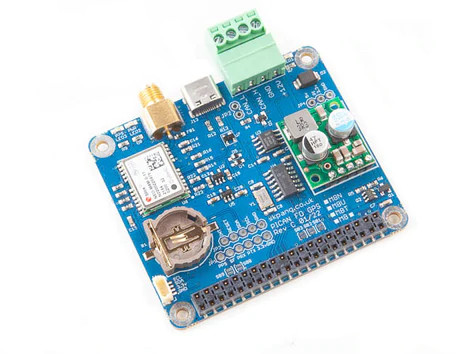
More PiCAN HATs for the Raspberry Pi
In addition to the PiCAN3, Copperhill Technologies offers a comprehensive range of PiCAN interfaces designed for a wide variety of CAN Bus applications. While the PiCAN3 is an excellent match for the Raspberry Pi 4, several newer PiCAN products fully support the Raspberry Pi 5 and provide additional features such as CAN FD communication, enhanced processing capabilities, and application-specific functionality.
The PiCAN product family also includes specialized NMEA 2000 HATs for marine electronics development, telematics-focused interfaces, and CAN Bus solutions for industrial automation, vehicle diagnostics, data acquisition, and IoT applications. Whether your project involves monitoring a marine network, developing a fleet management system, building an industrial gateway, or simply learning about CAN Bus technology, there is likely a PiCAN solution designed specifically for your requirements.
To explore the complete range of available products and capabilities, visit our PiCAN HATs product category page, which provides detailed information on the various interfaces and their supported applications. More information...